Billiard hall software that catches every peso your tables earn.
Stop losing money to missed billing, overtime nobody caught, and hand-written logs. Sargo runs table timers, checkout, and reports on one offline desktop app built for pool halls — not a generic POS.
Free walkthrough on your tables — 15 minutes, no obligation
Offline-first desktop app for Windows & macOS
New to Sargo? Get your first month free — live demo, setup & staff training included.
Up and running the same day.
No servers to configure and no training marathon. Install it, add your tables, and start your first session.
Install & activate
Install on your Windows or macOS computer and enter your license key. From there, Sargo works offline.
Set up tables & pricing
Add your tables and create flat-fee or hourly pricing packages, then pin your go-to rates to the floor.
Run the floor
Start sessions in one tap, take payments at checkout, and watch today's numbers add up in real time.
Everything you need to run the floor.
The daily work of a billiard hall — tracking time, catching overtime, closing bills, and knowing your numbers — handled in one place, so nothing slips.

Keep every table on track
Live timers run each session automatically, so your whole floor stays under control at a glance.

Get warned before time's up
On-screen and audible alerts fire before a session ends — no surprises for your staff or your guests.

Never lose money to overtime
Open and expired sessions are flagged and billed accurately, down to the last centavo.

See your business clearly
Revenue, hours, and utilization by table, package, and payment method — the moment a session closes.
Run Professional Billiard Tournaments with Confidence
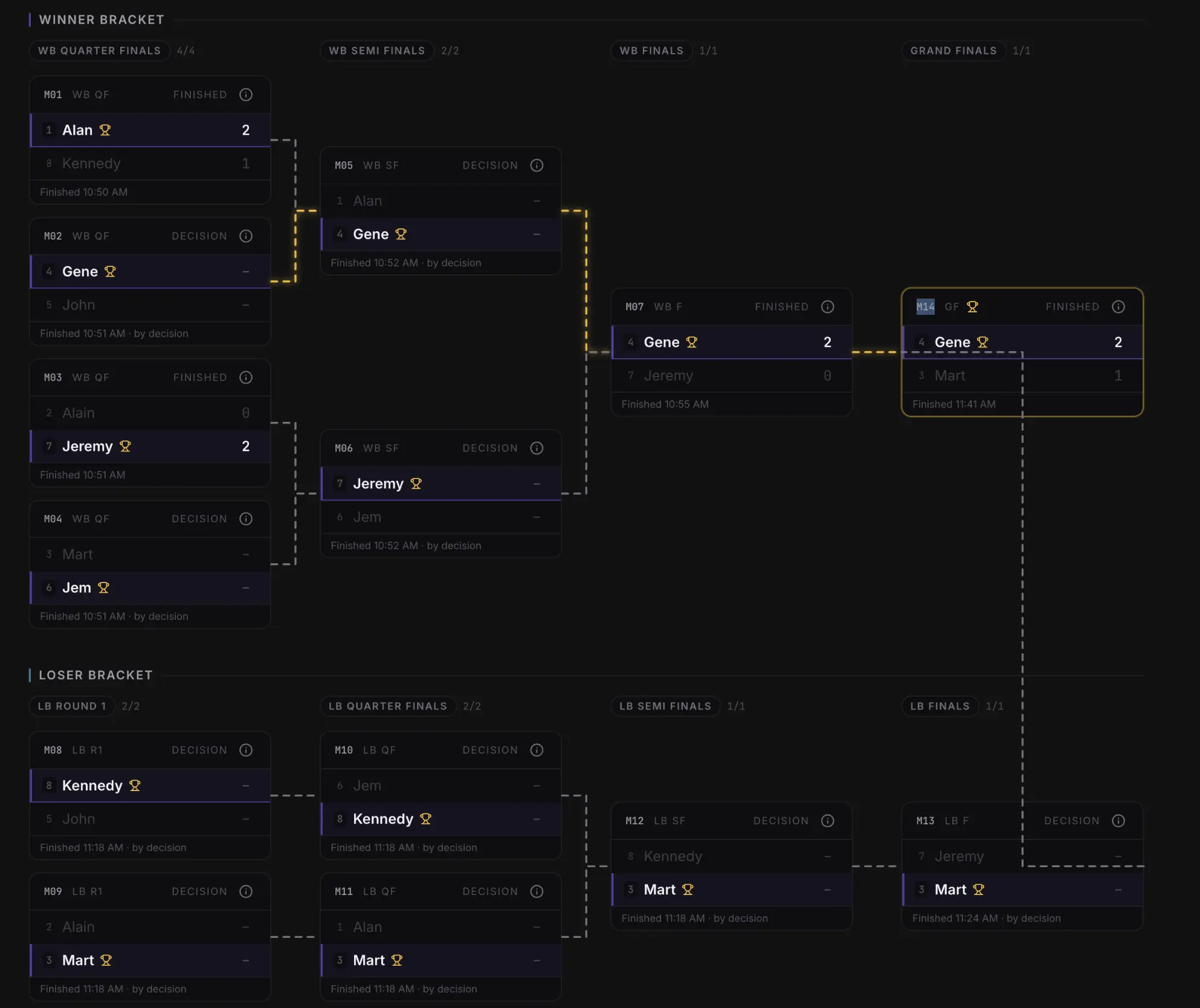
Organize brackets, monitor live standings, trace every player's tournament journey, and crown your champion — all inside Sargo Pro.
From the first round to the Grand Finals, Sargo Pro keeps your bracket accurate as matches finish. No whiteboard to redraw, no spreadsheet to patch, no internet required.
- Automatic Winner & Loser Brackets
- Live Tournament Standings
- Player Journey Visualization
- Grand Finals Tracking
- Offline Tournament Management
- Built for Competitive Billiards

Meet Sargo AI — your offline business assistant.
Sargo AI is built specifically for running your billiard hall — not a general-purpose chatbot. It monitors your tables, answers questions about your business, summarizes reports, and surfaces operational insights from your own local data, even with no internet. For advanced reasoning or creative work, you can optionally connect a cloud AI provider like ChatGPT.
A specialized assistant for billiard-hall operations — grounded in your data, not a ChatGPT replacement.
Offline AI
Runs on your own PC and answers from local data — no internet required.
Business insights
Spot trends, busy hours, and idle tables so you can act on what's happening.
Table monitoring
Ask what's live, ending soon, or overdue across the whole floor in plain language.
Report summaries
Turn a day or week of numbers into a clear, plain-English recap in seconds.
Local data
Everything stays on your computer — your business data never leaves the device.
Optional cloud AI
Connect ChatGPT or another provider when you want heavier reasoning — entirely your call.
Command your floor
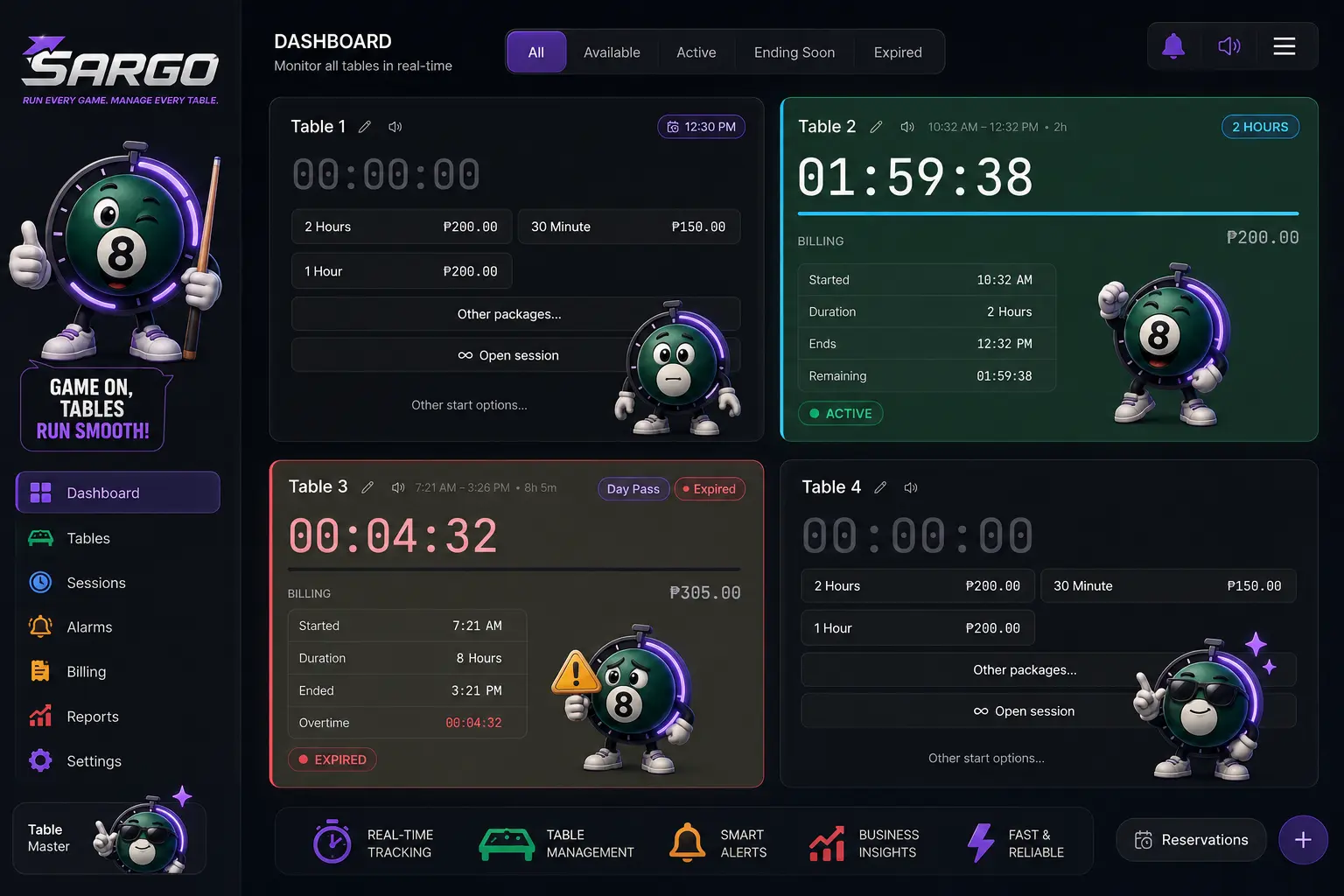
Every table, live, at a glance.
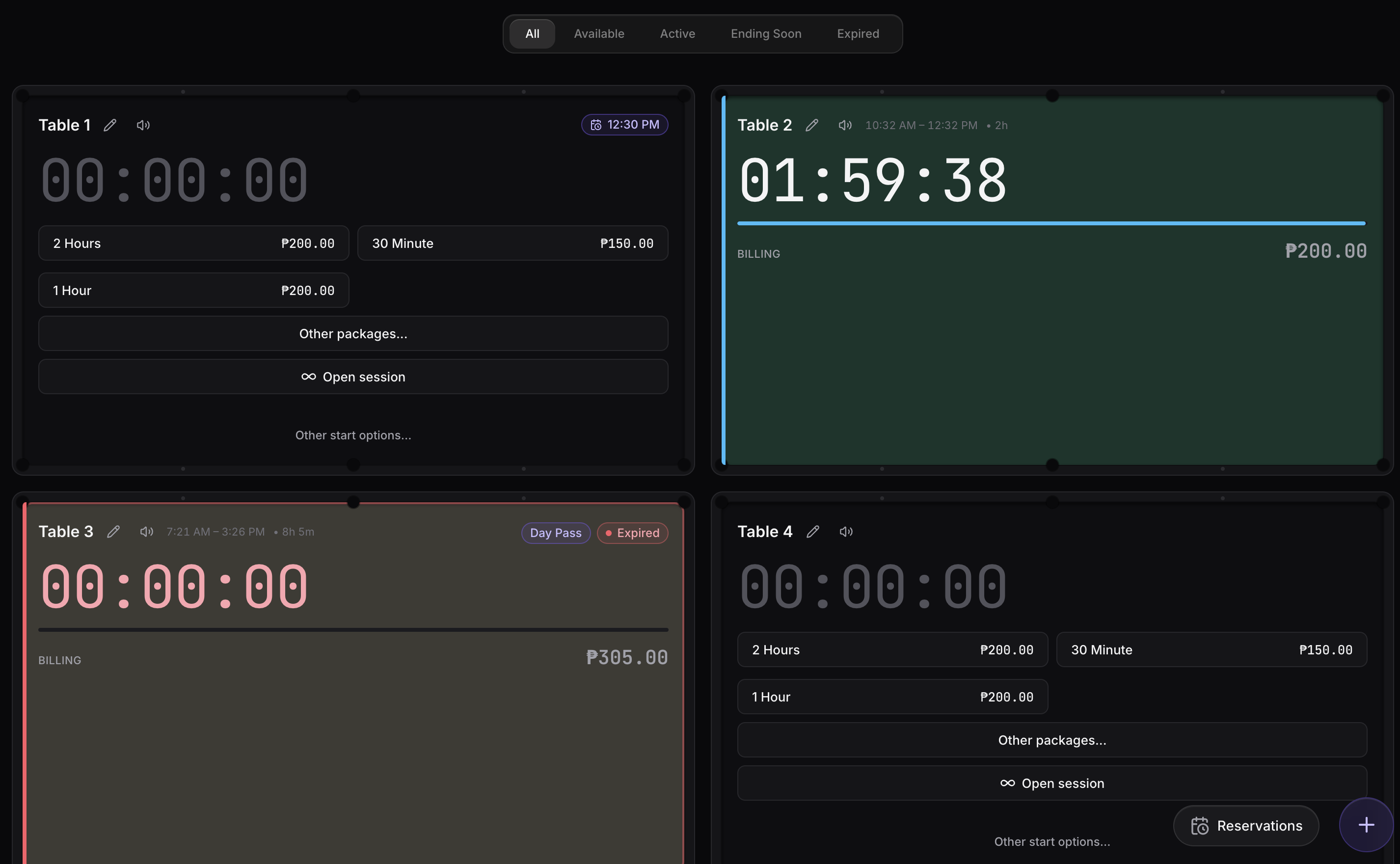
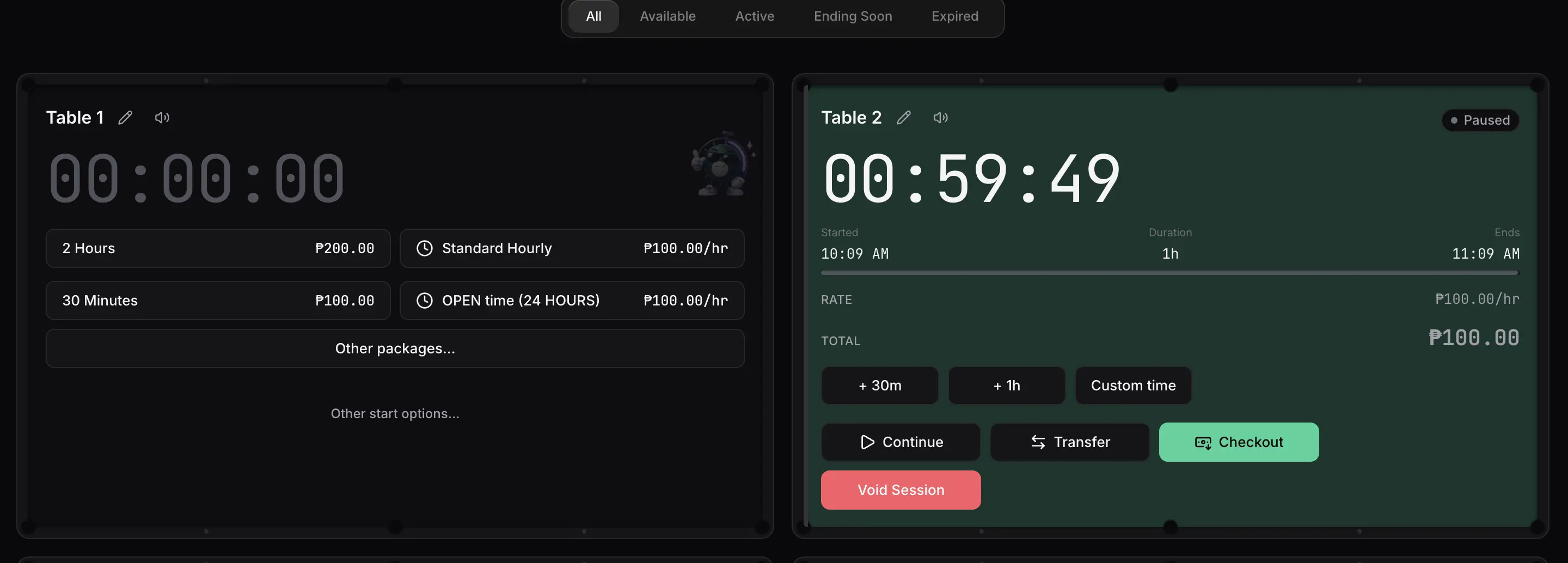
The dashboard is your control room. Each table shows its live timer and status — so anyone at the counter knows instantly what's free, what's running, and what needs attention.
Live countdowns
Real-time timers on every table, styled like the felt they sit on.
Clear status at a glance
Available, Active, Ending Soon, and Expired — color-coded across the whole floor.
One-tap start
Quick-start packages, open time, day passes, or custom sessions in a single tap.
Day's numbers up top
Revenue, sessions, hours, and reservations for today — always in view.
Smart reservations
Book ahead without the double-booking headaches.
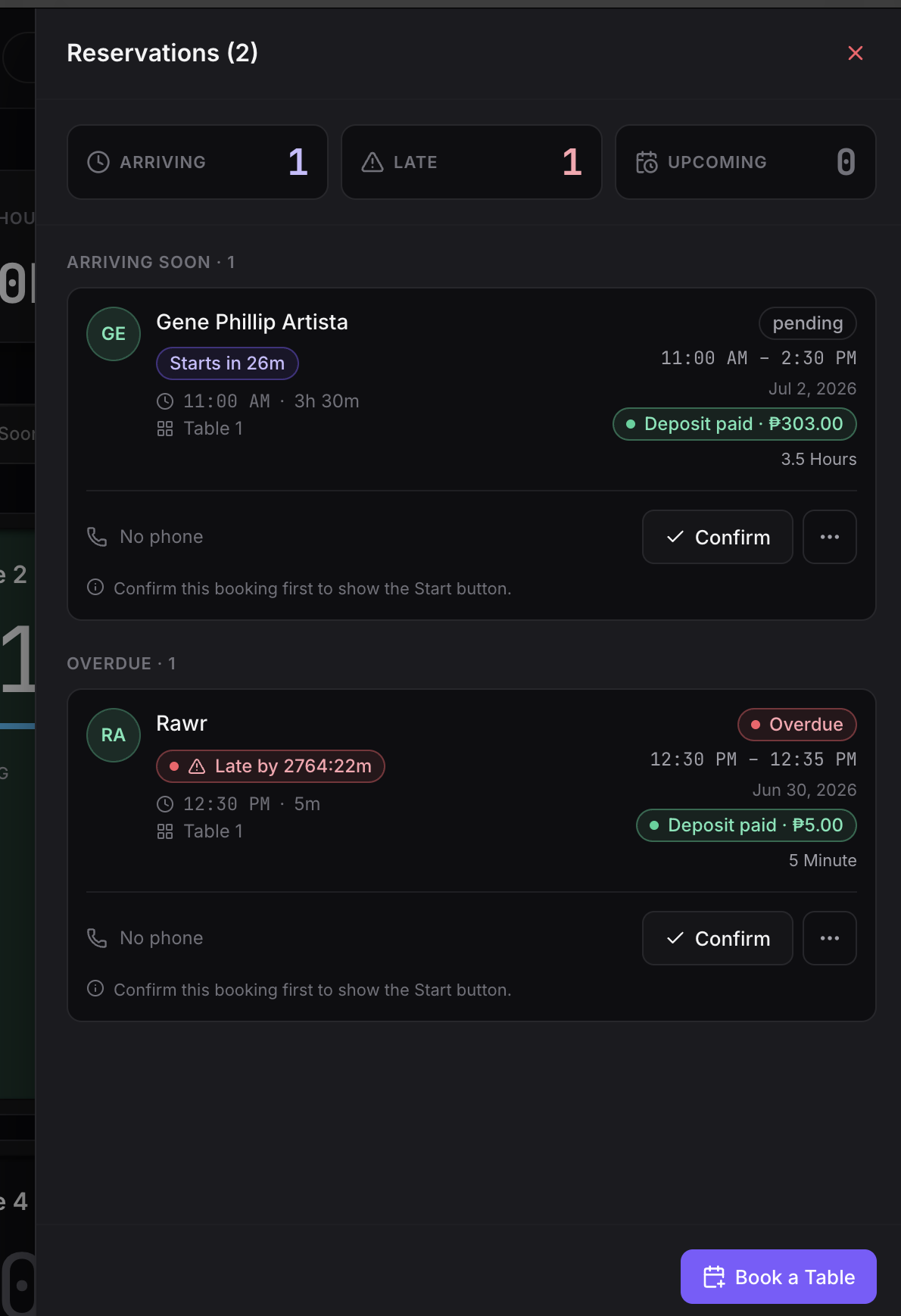
Take bookings by phone or at the counter, hold the right table for the right time, and turn a reservation into a live session with one tap.
Conflict prevention
Overlapping bookings on the same table are blocked automatically.
Live arrival tracking
See who's arriving soon and who's overdue, with live countdowns.
Returning guests
Search past guests to prefill a booking in seconds.
Advance payments
Record a deposit at booking; it carries straight onto the session.
Live session control
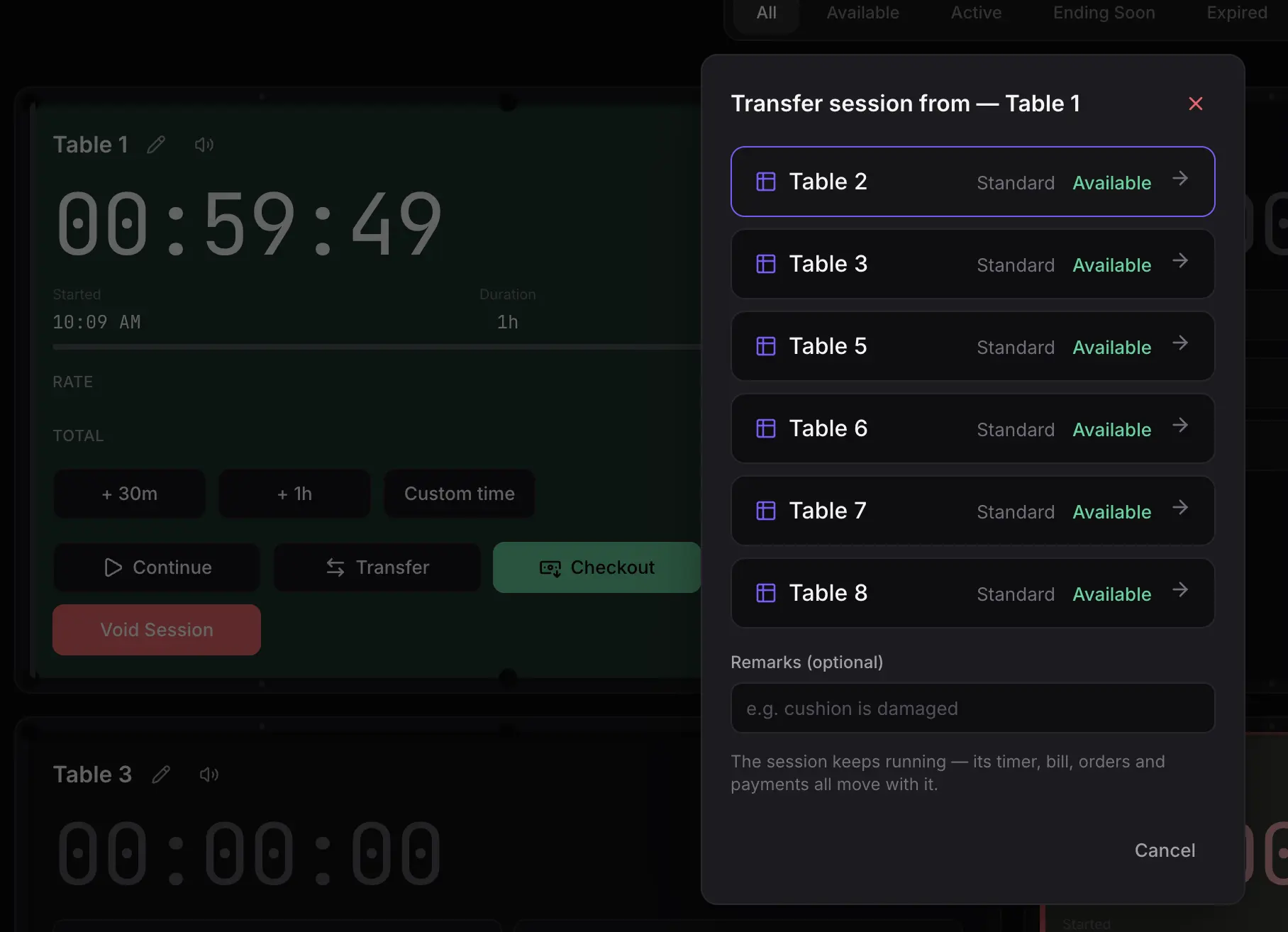
Move a running session to another table — no void, no checkout.
A wobbly cushion, a noisy corner, a group that outgrew their table. Transfer the live session to a different table in a couple of taps: the timer keeps running, the package stays applied, and the bill follows the players.
Timer keeps running
Elapsed time and remaining time carry over untouched — nothing restarts.
No void, no re-ring
The transaction stays open, so you don't void a sale or re-enter a package to fix a table.
Bill follows the players
Charges, discounts, and any partial payments move with the session to the new table.
Both tables stay accurate
The old table frees up immediately and the new one shows as occupied — the floor view never lies.
Never miss a beat
Alerts that reach you anywhere in the app.
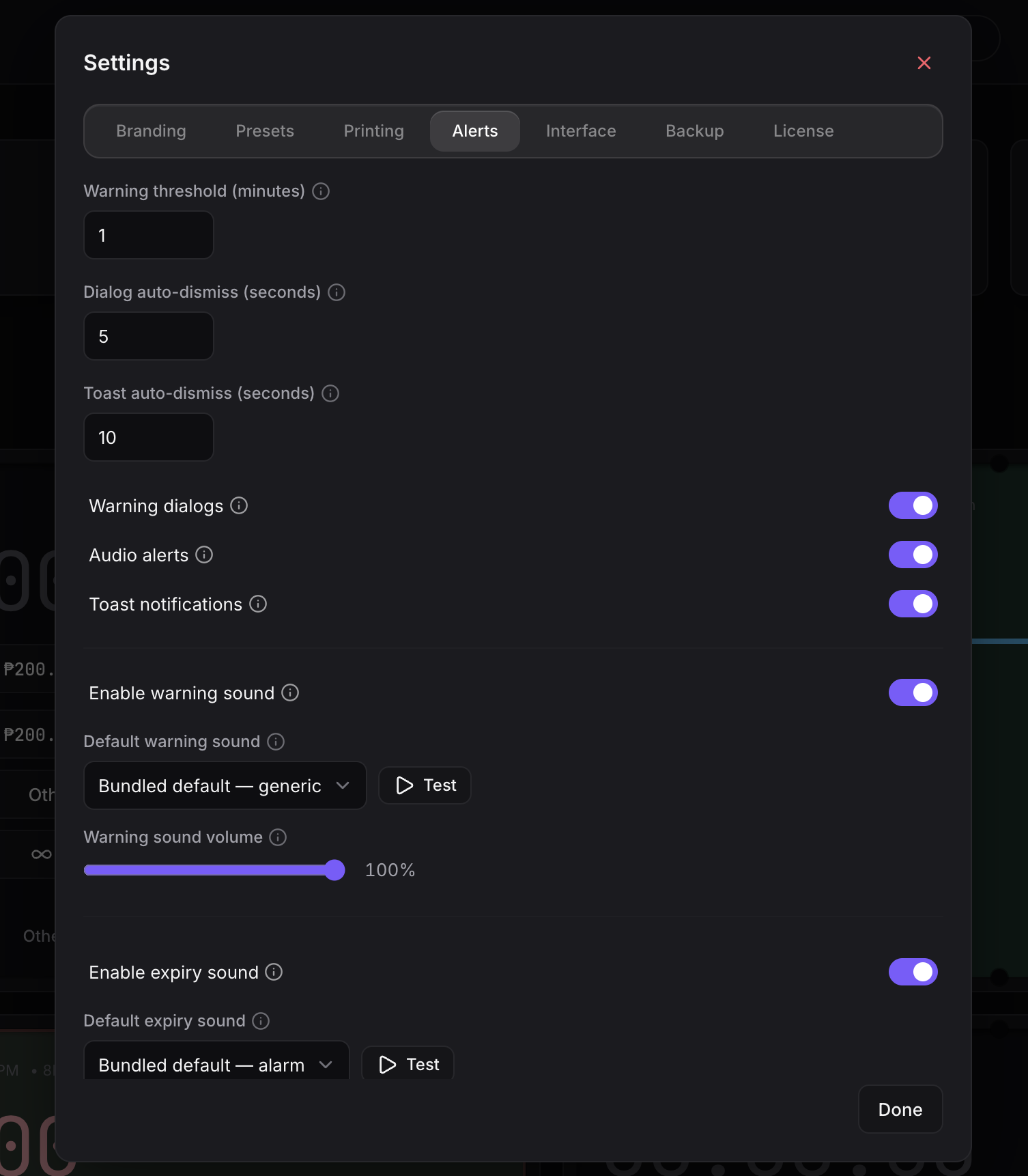
Sargo warns before a session ends and again when it expires — with on-screen prompts, corner notifications, and audible sounds you can assign per table. Wherever you are in the app, you'll know.
On-screen warnings
Floating prompts at 5 minutes, 1 minute, and on expiry.
Audible alerts
Assign warning and expiry sounds per table — upload your own clips.
Corner notifications
Non-intrusive toasts for every start, extension, payment, and close.
Tunable
Set warning thresholds, volume, and auto-dismiss timing to fit your floor.
A complete AI Voice Pack — in every Sargo license.
Your staff can keep an ear on the floor without watching the screen. Every license ships with ready-to-use voice announcements and alert sounds — no extra setup, no add-on fee.
9 spoken table warnings — “Table 1, 5 minutes left.” through Table 9
Start-session sound (billiard break)
Session-expired alarm (classic timer)
Ready to use — no additional setup required
Table warnings
Session sounds
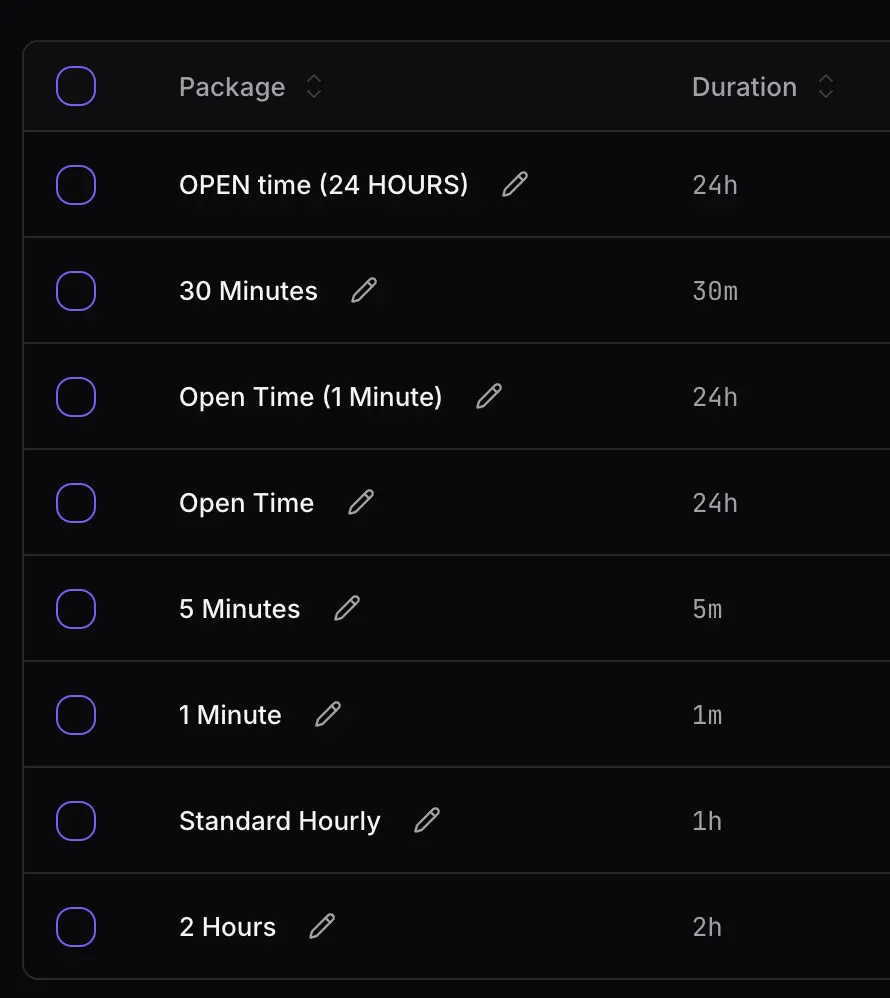
In-app pricing tools
Set your own rates — Sargo bills them automatically.
Create reusable pricing packages — flat-fee or hourly — and put the ones you use most a single tap away. Schedule happy-hour rates, weekend pricing, or per-table-type rates without touching a spreadsheet.
Flat-fee or hourly
Fixed packages for promos and passes, or metered hourly rates.
Availability schedules
Weekly day/time windows — even overnight — for time-based pricing.
Per table type
Different rates for different table classes, or one rate for all.
Quick-start
Pin your go-to packages to the floor for instant one-tap starts.
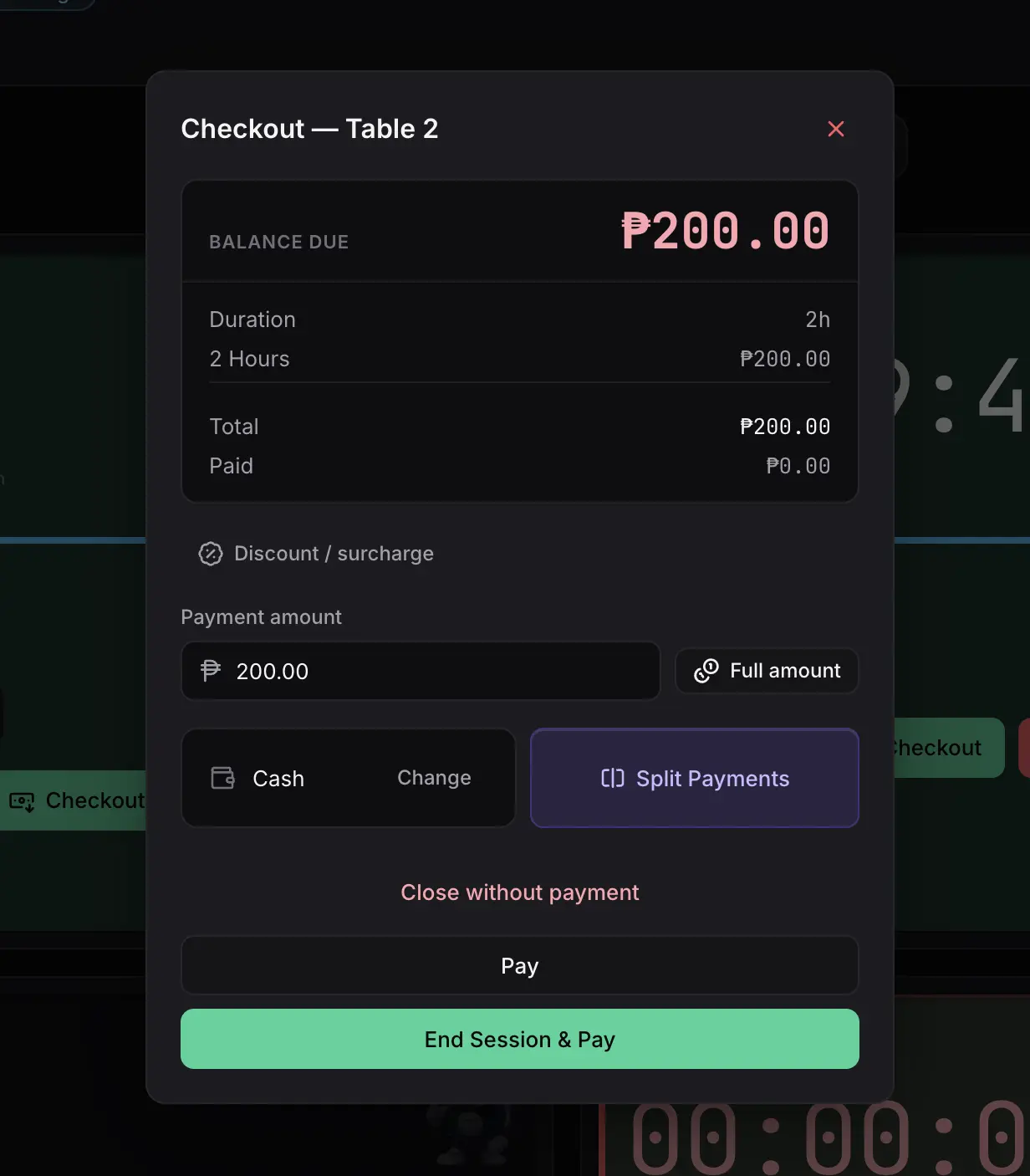
Fast, correct checkout
Close out a table in seconds.
One clear balance, an itemized breakdown, discounts and surcharges when you need them, partial payments, and a printed receipt — all from a single dialog.
Clear balance due
The exact amount owed, front and center.
Discounts & comps
Apply a discount, surcharge, or make it free — all recorded.
Partial payments
Split across methods or collect in stages; the ledger stays exact.
Receipts
Print an 80mm thermal receipt, and reprint later from history.
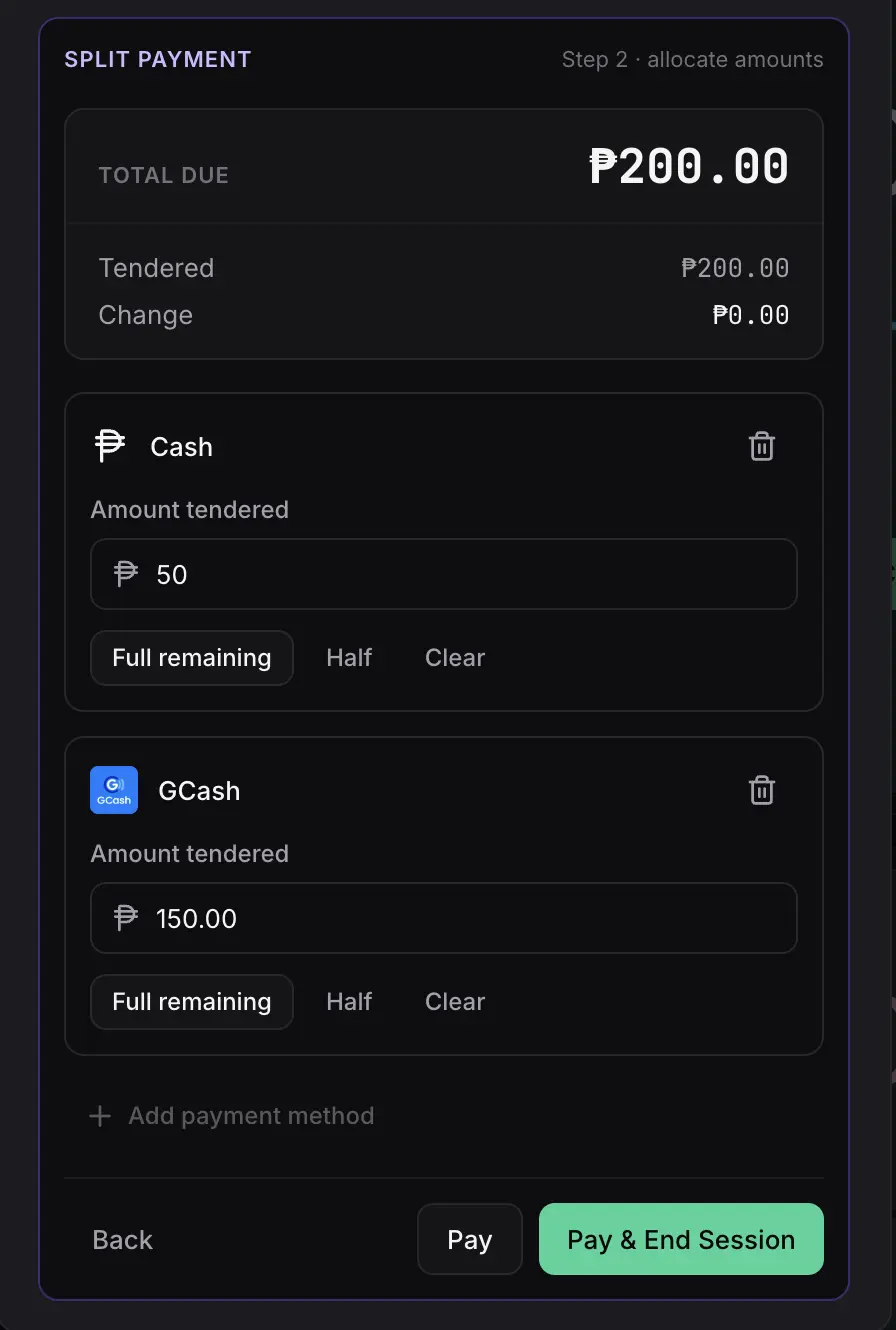
Flexible payments
Split one bill across multiple payment methods.
Managing payments just got easier. Split a single bill across a mix of Cash, GCash, cards, bank transfers, and more — perfect for groups where everyone pays their share their own way, while the ledger stays exact.
Mix payment methods
Cash + GCash + card on one bill — any combination, each recorded under its method.
Built for groups
Everyone pays their share their own way; Sargo tracks the remaining balance live.
Exact to the centavo
Every split is checked against the balance due — no over- or under-collection.
Clean reporting
Each split lands in your reports attributed to its payment method.
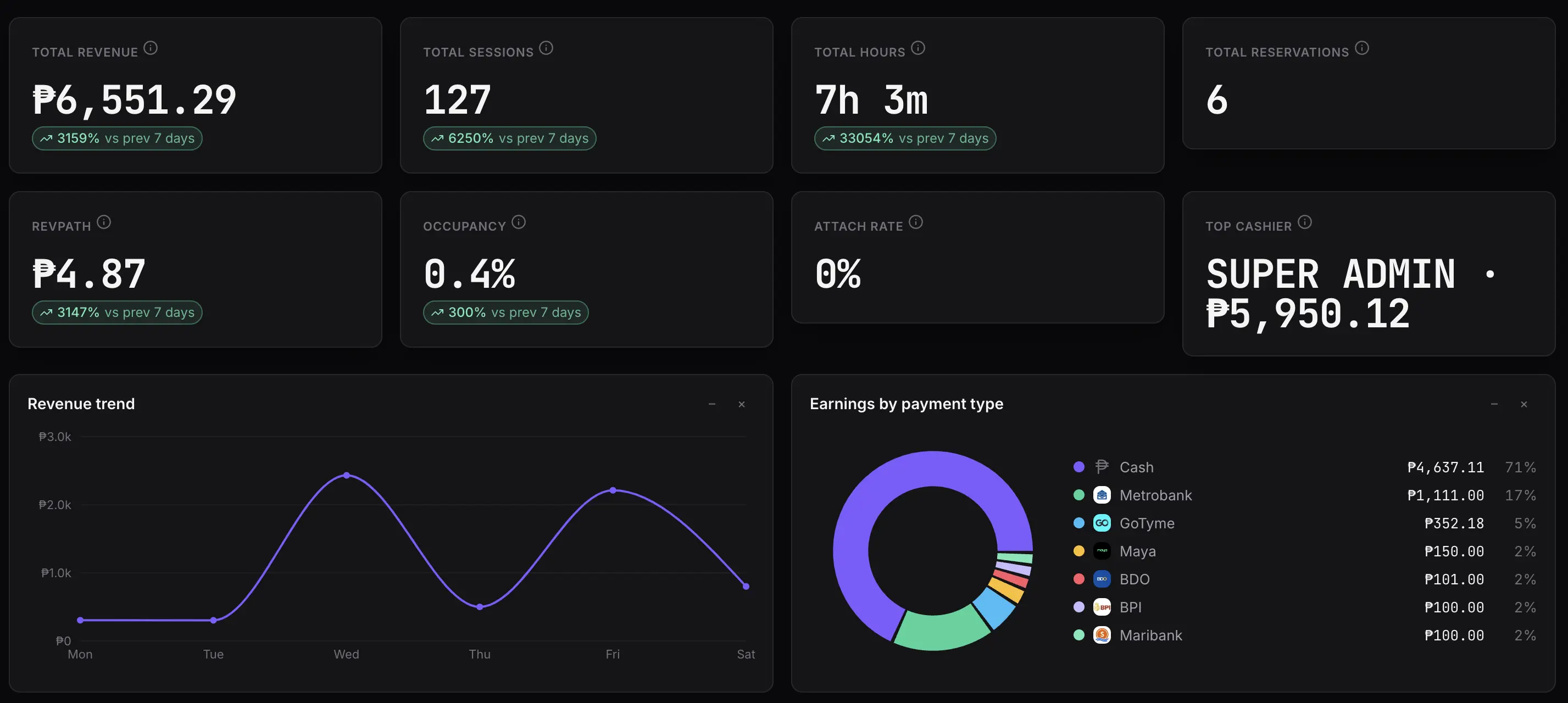
Know your numbers
Reports that explain your business.
Understand exactly where your revenue comes from — by payment method, package, and table — and how hard each table is working.
Revenue you can trust
Collected revenue attributed by when it was actually paid.
Breakdowns that add up
By payment method, package, table, and billing type.
Utilization
Sessions, hours, and takings per table to spot your best (and idle) tables.
Trends
Period-over-period movement so you know if you're up or down.
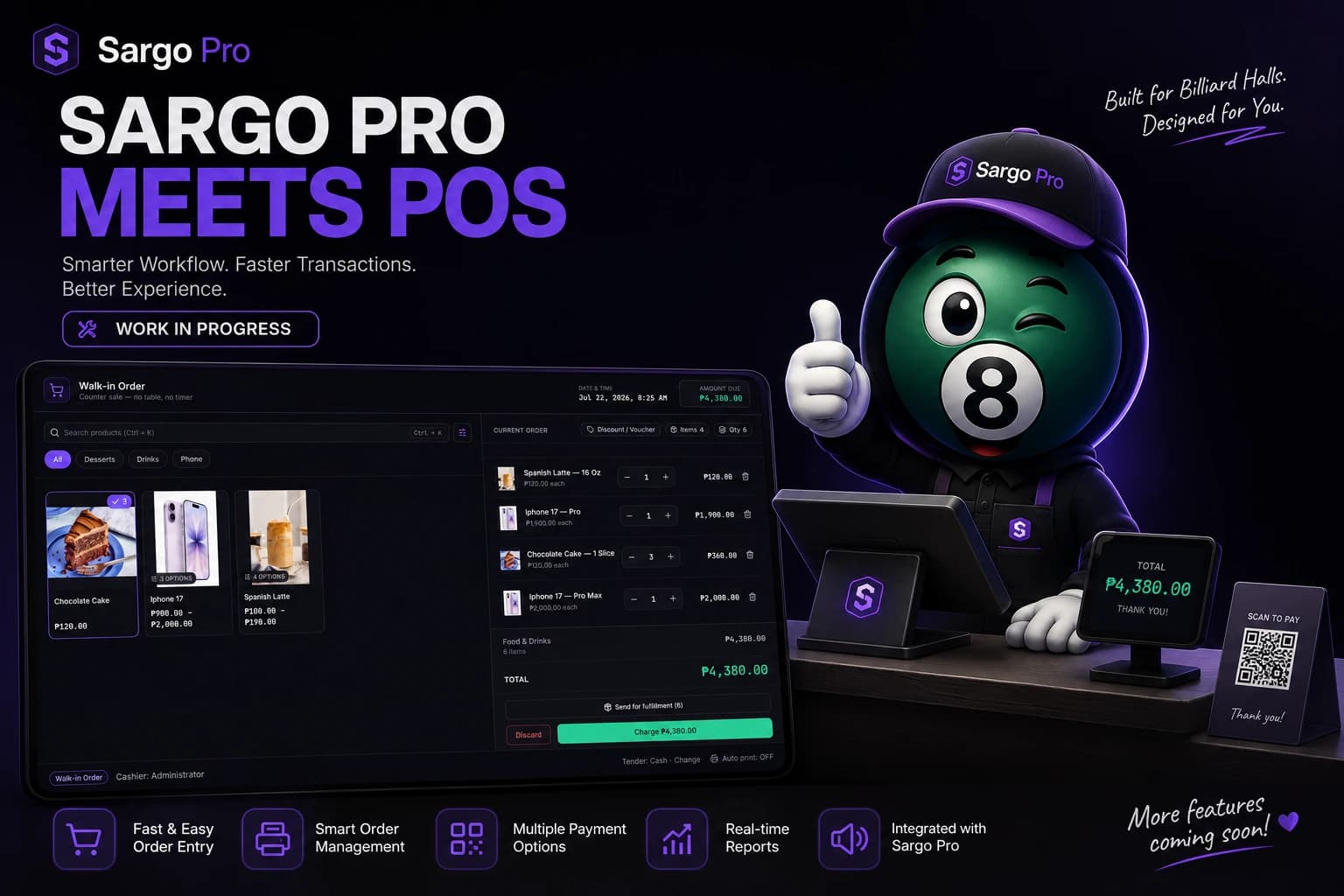
Introducing Commerce
Sargo Pro meets POS
Everything your billiard hall needs — table management, reservations, billing, and now a modern Point of Sale — all inside one powerful platform.
We're building a seamless POS experience designed specifically for billiard halls. Manage walk-in sales, food and drinks, merchandise, customer orders, and payments without leaving Sargo Pro. One system. One workflow. Zero switching between applications.
- Fast walk-in transactions
- Food & beverage ordering
- Merchandise sales
- Multiple payment methods
- Kitchen / fulfillment workflow
- Sales reporting
- Inventory-ready architecture
- Integrated with table sessions
- Offline-first performance
This feature is currently under active development and will be available in a future Sargo Pro release.
Built for billiard halls — not a notebook, spreadsheet, or generic POS.
Pen-and-paper and generic tools can limp along, but they miss the overtime, the live floor status, and the numbers that actually run a pool hall. Here's how Sargo compares.
| Capability | Sargo | Notebook / Excel | Generic POS |
|---|---|---|---|
| Built specifically for billiards | Yes | No | No |
| Live table timers & floor status | Yes | No | Limited |
| Catches overtime automatically | Yes | No | Limited |
| Accurate per-centavo billing | Yes | Limited | Yes |
| Works fully offline | Yes | Limited | Limited |
| Reservations without double-booking | Yes | No | No |
| Reports that explain your business | Yes | Limited | Limited |
Take payments your customers already use.
Cash and card come built in, alongside the Philippine e-wallets and banks your guests expect — plus your own custom methods.
E-Wallets
 GCash
GCash Maya
Maya GoTyme
 Maribank
Bank Transfers
 BDO
BDO BPI
BPI Metrobank
 PNB
PNB UnionBank
 Security Bank
Simple, offline licensing
Activate once. Work offline with confidence.
Enter your license key once to activate Sargo on a computer. It's tied to that device and keeps working offline — no need to stay connected to run your hall.
Offline operation
Keep working without internet inside a 30-day validation window.
Device-bound keys
Each license activates one computer, keeping your license yours.
Graceful by design
If a license lapses, checkout and reports keep working while you sort it out.
Free device transfers
Moving to new hardware? Support transfers your license (up to 2×/year).
See it work on your tables, risk-free.
We know Sargo isn't a fit for everyone. That's why every demo is a walkthrough on your actual tables, with your actual pricing — free, no purchase needed, and you'll know instantly if it works for your hall.
Works offline
Runs on Windows or macOS without internet — your data stays on your computer.
No spreadsheets
Timer, checkout, reports, and reservations in one app. No pen and paper.
Catches money
Tracks every peso — overtime, discounts, partial payments, all to the centavo.
Supports you
Licensed and supported directly by AdvancePH. Email support included.
Trusted by Growing Billiard Halls
More billiard halls joining soon. Join billiard halls across the Philippines that trust Sargo Pro to manage their daily operations.
 Official Sargo Pro ClientActual Client Deployment
The Elements Billiards
Official ClientNow Powered by Sargo Pro
The Elements Billiards is officially using Sargo Pro to modernize and simplify its billiard hall operations.
- Session Timers
- Voice Announcements
- Reservations
- Offline Ready

🎱 Try Sargo FREE for 1 Month
Experience Sargo risk-free for one month. We'll schedule a live demo, help you set up the system, guide you through all features, and train you on how to use it. Just prepare a Windows PC or laptop for the installation and testing.
- Personalized live demo on your tables
- Complete system setup assistance
- Onboarding through every feature
- Basic staff training
The live demo typically lasts 30–60 minutes and includes setup assistance, onboarding, and staff training.
A Windows PC or laptop is required for the demo, setup, and testing.
Available for new Sargo customers. Demo schedule is subject to availability.
Trusted by billiard halls across the Philippines.
Simple, per-device licensing.
Pick the license that fits how you operate. One license covers one computer — and every additional license is half price.
50% off every additional license. Running Sargo on more than one computer? Every license after the first is half price — for the 2nd, 3rd, 4th device and beyond.
Monthly
per device / month
Lowest upfront cost. Includes updates and support while active.
- All features included
- Software updates & critical fixes
- Technical support while active
- Cancel anytime
Annual
per device / year
Three months free versus monthly. Best for steady operations.
- Everything in Monthly
- ≈3 months free vs. monthly
- Priority support while active
- Billed once a year
Lifetime
per device, one-time
Pay once, own it. Lifetime critical fixes; 12 months of support.
- One-time payment — no renewals
- Lifetime critical bug fixes
- 12 months complimentary support
- Best long-term value
Prices are per physical device. Payment via GCash or Maya. Monthly and Annual licenses include updates and support while active; Lifetime includes lifetime critical fixes and 12 months of support. Final pricing for multiple devices is confirmed when you get in touch.
Questions, answered.
Everything owners and staff ask before running Sargo on the floor.
Yes. Sargo is offline-first. Timers, reservations, billing, checkout, receipts, and reports all run locally on your computer with no connection required. The internet is only needed briefly to activate your license — after that Sargo keeps working offline within a 30-day validation window.
All of your data lives in a local SQLite database on your own computer — nothing is sent to a cloud server. It stays in place across app updates. Sargo includes built-in backup and one-click restore, plus optional automatic backups, so you can keep safe copies of your data.
Yes. Each license covers one physical computer (device). If you run Sargo on several front desks or branches, each computer needs its own license — and every license after the first is 50% off.
Your license is tied to the hardware it was activated on. If you replace or upgrade a computer, contact support for a free reactivation transfer (up to two per year per license). Reinstalling on the same computer keeps working with the same key.
Sargo records payments at checkout and prints receipts. It ships with Cash and Credit Card plus popular Philippine methods — GCash, Maya, GoTyme, Maribank, BDO, BPI, Metrobank, PNB, UnionBank, and Security Bank — and you can add your own methods with custom logos.
Just a Windows or macOS computer. Receipt printing works with standard 80mm thermal receipt printers. Everything else runs on the computer you already have at the counter.
Yes. Sargo has role-based access. A Super Admin manages accounts and roles, while Staff get day-to-day operations. You control which screens and actions each role can use.
You create Pricing Packages — either a flat fee or an hourly rate — and can scope them to specific table types, add validity dates, and set weekly availability schedules. Start a session with one tap, run open (count-up) time, day passes, or custom durations. All money is tracked to the exact centavo.
Monthly and Annual licenses include updates and technical support while active. Lifetime licenses include lifetime critical bug fixes and 12 months of complimentary support. Support covers the software itself.

Ready to run a tighter, more profitable floor?
See Sargo on your own tables. Get a free demo walkthrough and we'll show you how it fits your hall.
Let's get Sargo on your floor.
Sargo is sold directly by AdvancePH. Reach out and we'll set you up with a demo, pricing for your number of tables, and your license.